How it helps
How it works
- Sign in with Google and create a projectAbout 2 minutes.
- Add expenses, attendance and payments as they happenFrom your phone, on site.
- See totals, dues and stage progress any timeAnd share them with your client.
New in Site Manager
Recent updates, on the Android app and the web.
Menus, buttons and screens in English, Hindi, Kannada, Marathi, Tamil or Telugu. Change it any time in Settings; your entries stay exactly as you typed them.
All the features
Everything is in every plan. A few are for engineers and contractors only, and are marked.
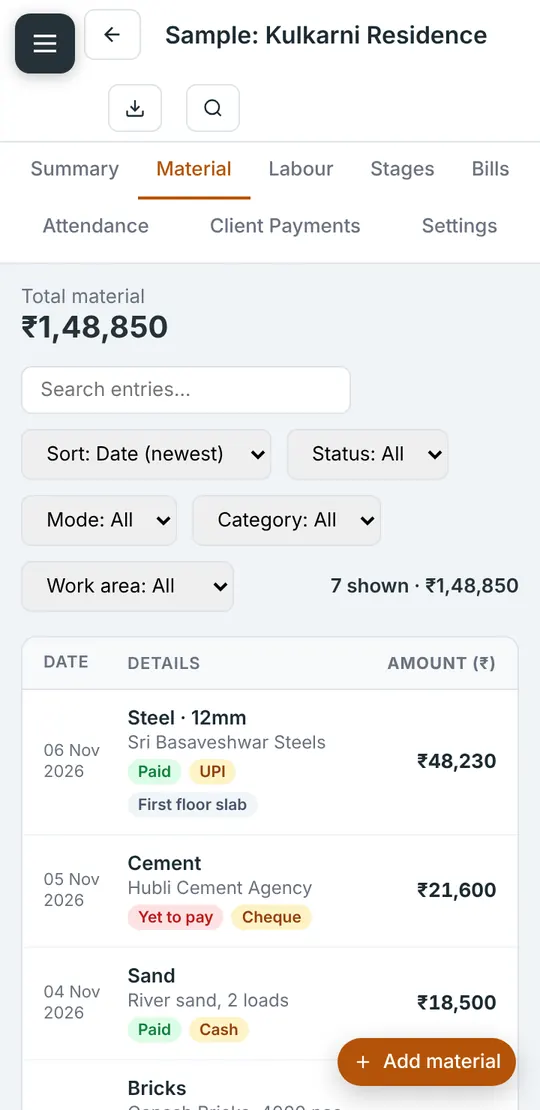
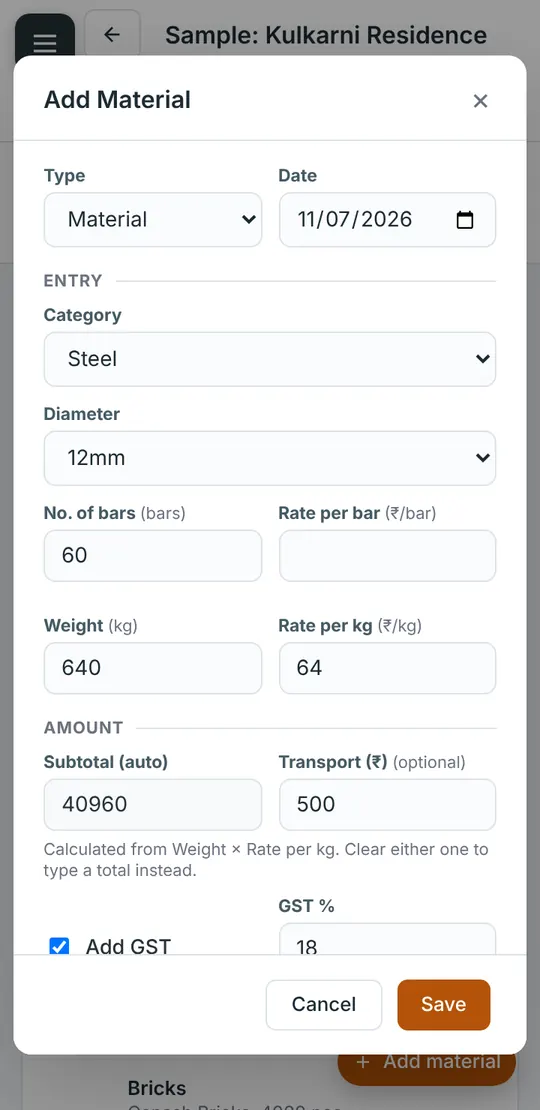
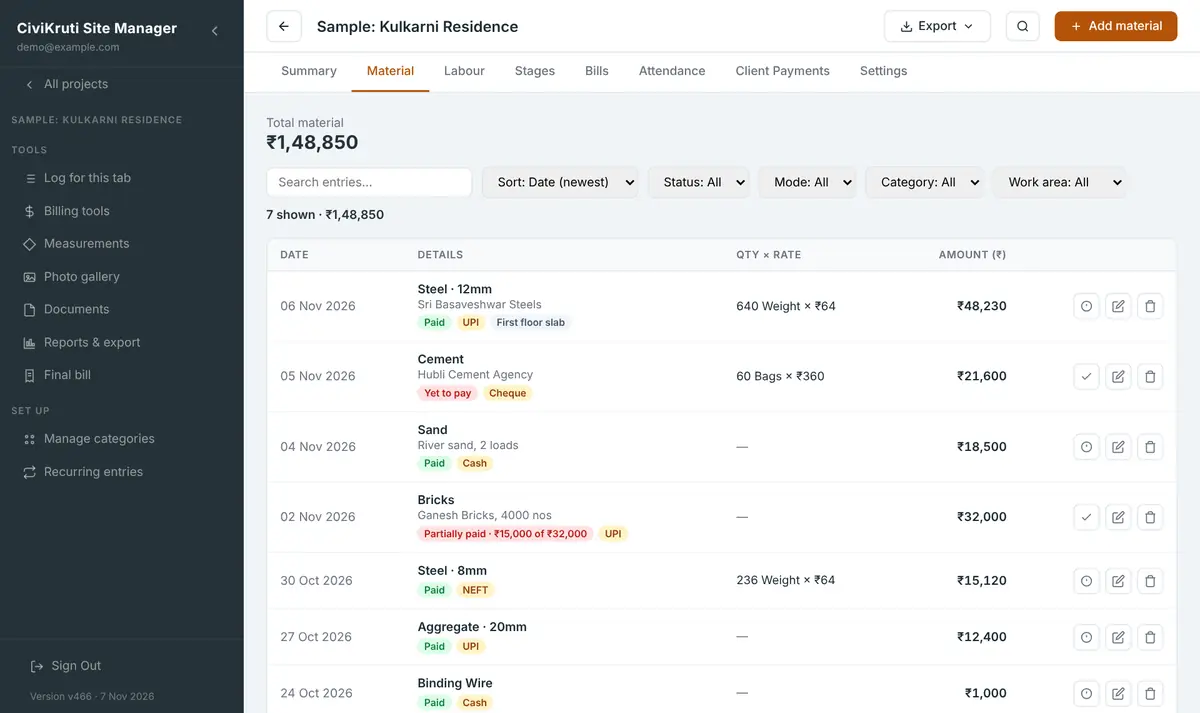
- Material, labour and billswith GST, transport, payment mode (UPI, cash, cheque, NEFT) and paid / yet to pay / part paid
- Quantity × rate worked out for yousteel by bars or by weight (several diameters in one entry), cement by bags, area × rate for gates and grills
- Recurring expensesrent, salaries or hire charges added by themselves, monthly, weekly or yearly, with no date missed
- Your own categories and entry fieldsadd the materials and labour types you use
- Search and filtersby category, vendor, note, amount, payment mode or work area
- Expenses ledgerEngineer / Contractorevery payment in and out across all projects, month by month
- Daily attendance and man-daysby labour type, against the stage worked on
- Weekly labour billEngineer / Contractorfrom attendance, your day rates and your weekly payment day
- Days with no workrain, material not at site, labour did not come… counted for the month
- Measurementsfeet-inches or metres, with quantities worked out; Kadapa wardrobe stone lists
- Work areasbuilding, compound wall, sump… with spend for each
- Construction stagesplan the stages and track progress; share them as a PDF or Excel sheet with dates, days late, spend and payments
- Material to arrange nowwhat the coming work needs, before it holds up the site
- Budget trackerHome Ownerset what you plan to spend and see how much is left
- Client payments receivedEngineer / Contractorwith receipt photos, and the balance always in view
- Client billEngineer / Contractorby floor area and rate, ready as a PDF
- Mason and centring billsitemised from a rate card with a rate for every size, as a PDF
- Final billEngineer / Contractorthe closing bill from the recorded items
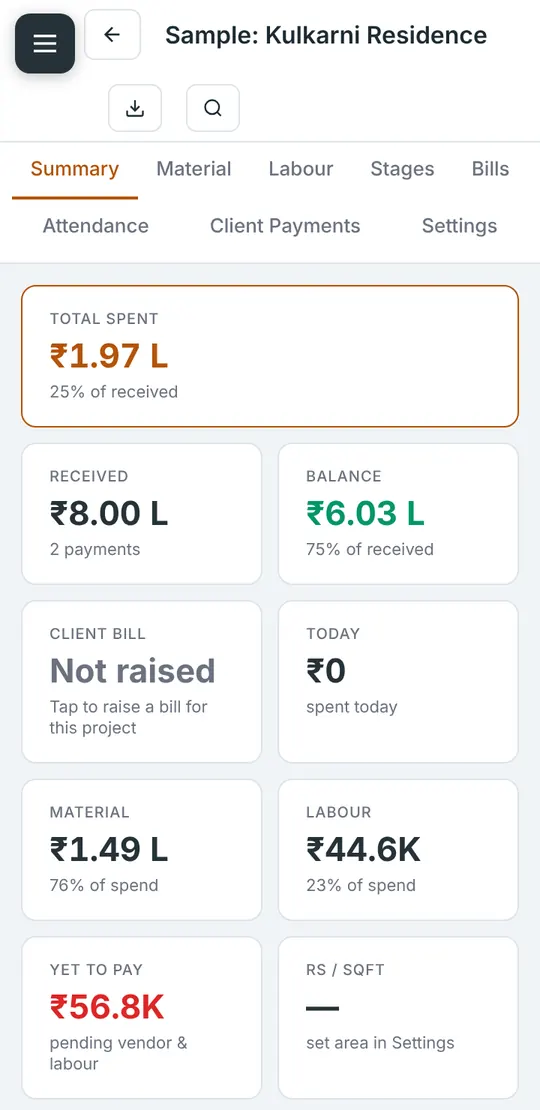
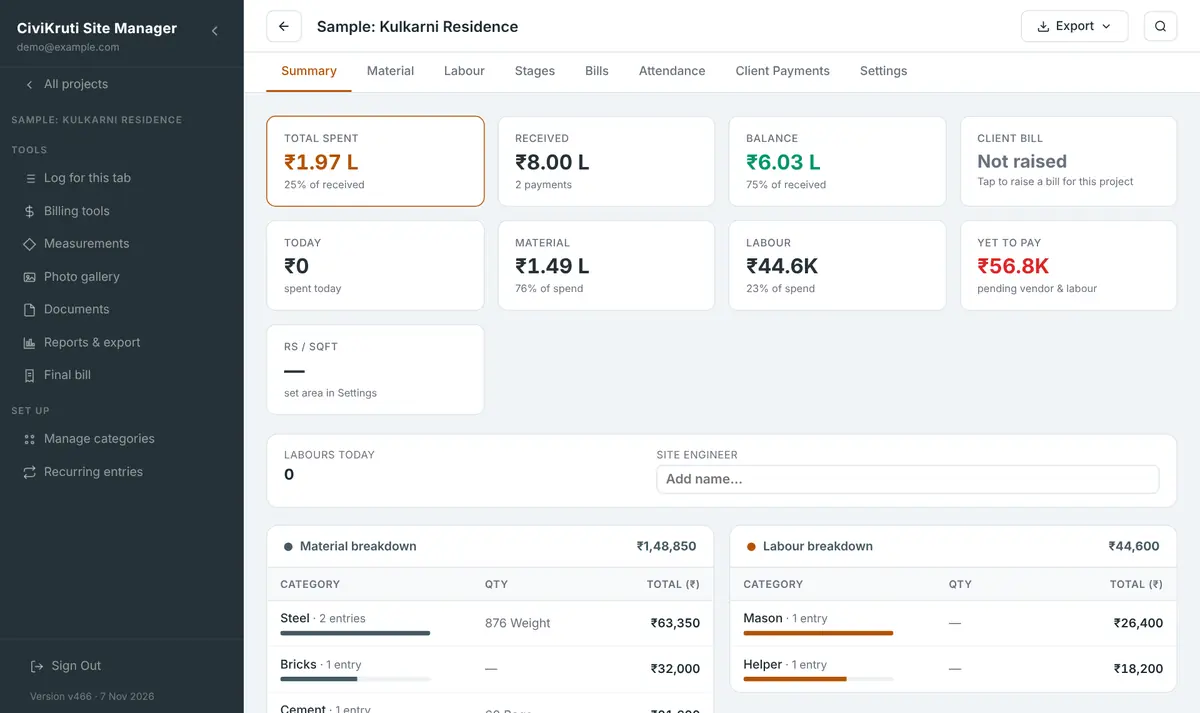
- Project summaryspent, received, balance and yet to pay, at any moment
- Business reportsEngineer / Contractorturnover, spending and net margin by month, quarter or financial year
- Profit and lossEngineer / Contractorfor every project, and your real income month by month
- Rate analysis across projectsEngineer / Contractorcost per sq ft by building type and floors, material-wise and labour-wise, to quote new work from your own history
- Overheads and supervisorsEngineer / Contractoroffice costs (with an end date when one stops) and supervisor salaries split across sites
- Reports in PDF and Excelprofit & loss, cash flow, day book, GST, ledgers, pending payments, attendance register and stage progress, for any period
- Work orders and material requirementsbilled, paid and left to bill for each contractor; material needed at site, ordered and received
- Parties, bill numbers and category budgetsGSTIN and opening balances for suppliers and contractors; budget against actual for each category
- PDF, Excel and CSV exportevery report and list, plus the full project pack for your client
- Many projects in one accountEngineer / Contractoreach with its own totals
- Share a projectEngineer / Contractor"Can edit" for your team, "View only" for your client; transfer ownership when a project changes hands
- Archive finished projectsEngineer / Contractorout of the way, but every record kept to refer back to
- Recycle Bina deleted project can be brought back for 30 days
- Who entered whateach entry on a shared project shows who added it
- In your languageEnglish, Hindi, Kannada, Marathi, Tamil or Telugu
- Bill photos and documentsreceipts, drawings, agreements and approvals stored with the project, not only on one phone
- Backup and restoreto a private Google Drive folder (7 copies kept) or to a file on your phone or computer
- Automatic daily backupthe Android app can back up by itself every day
- Saved to the cloudthe same account on the Android app and the web; the app works offline on site
- Encryptedon the way and when stored on Google’s servers; each project is shared only with the people you choose
See it
Sample data, not a real customer's. The same account works on the Android app and on the web.
On your phone
On your computer
Prices
These prices keep the app free of ads and your data private. What you pay motivates us to keep improving the app.
Engineer / Contractor: 30 days free for up to 3 projects, no card needed, then a plan for a year. (Accounts whose trial started before 15 Nov 2026 keep their 180 days.)
- Every plan has every Engineer / Contractor feature. Plans differ only in how many projects they cover: an archived project counts as half, and projects shared with you count too.
- A plan is per person, not per project: each person who adds or edits entries, including your team on a shared project, needs their own trial or plan. Anyone can always view for free.
- Pay here with Razorpay, or in the Android app through Google Play. One plan works on both. A plan bought here is one payment for one year and never renews by itself.
Questions
Is there a free trial?
Yes. As an engineer or contractor you get 30 days free for up to 3 projects, with every feature. No card is needed to start. As a home owner, one project is free for life. Each person who adds or edits entries needs their own trial or plan; viewing is always free.
Can my client see the project without paying?
Yes. Share the project as "View only"; you can hide sections such as client payments from their screen. Your client signs in free with the email you invited. Viewing is always free.
Does it work without internet on site?
The Android app works offline and sends your entries when the phone is back online. The web version keeps your entries through short drops in connection and sends them when it reconnects.
Will I lose my data if I stop paying?
No. When a plan or the trial ends, your projects become read-only: you can still open, back up and export everything, and nothing is deleted. Choose a plan again to add or change entries.
Is my data private?
Each project is shared only with the people you choose. Feedback you send never includes your entries, amounts, names or photos.
Can I use it in my language?
Yes. Choose English, Hindi (हिंदी), Kannada (ಕನ್ನಡ), Marathi (मराठी), Tamil (தமிழ்) or Telugu (తెలుగు) in Settings, on the Android app or the web. Menus and screens change to that language; what you type in your entries stays exactly as you wrote it.
Can I use it on the computer too?
Yes. This web version works in any browser with the same account as the Android app, so entries made on site appear on the computer and the other way round.